Passes
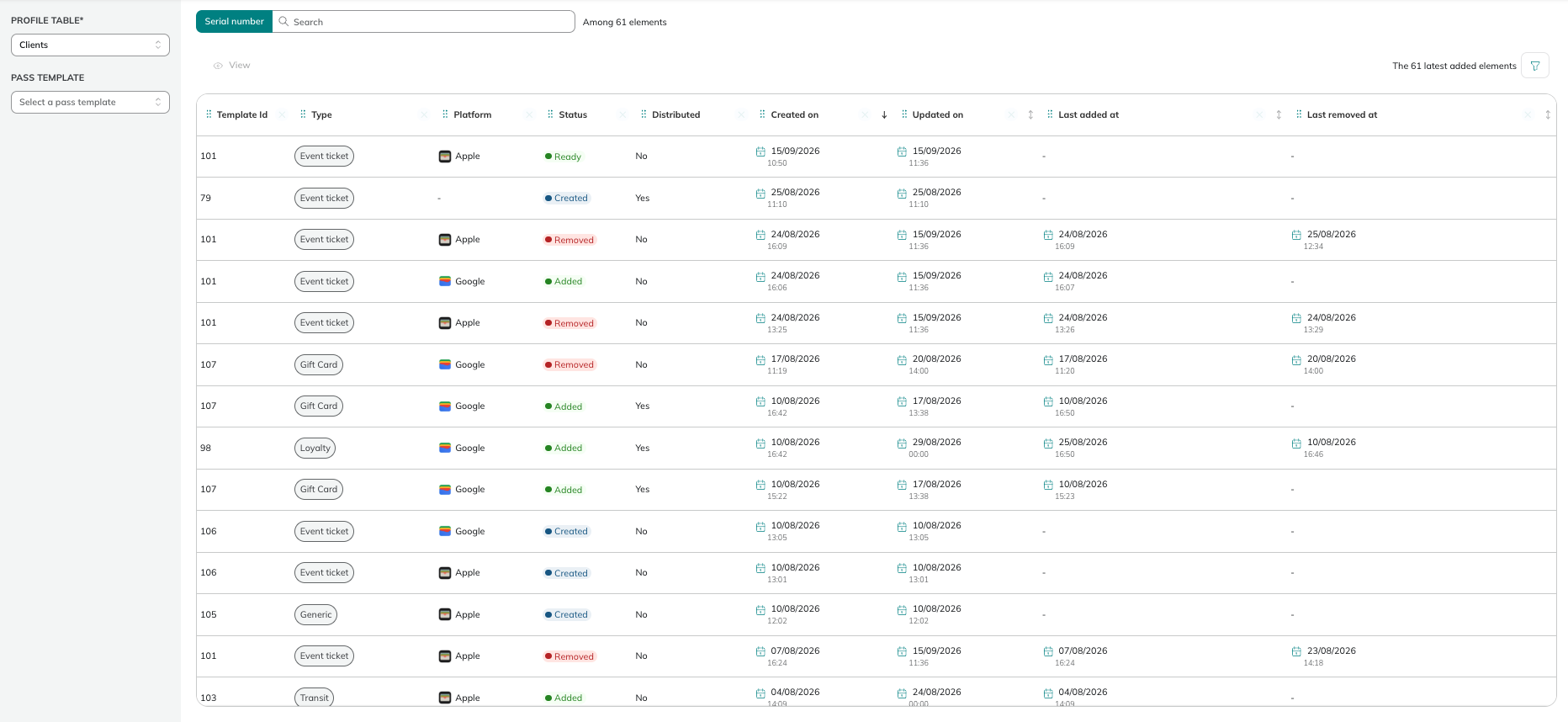
The Passes module gives you a centralised view of all passes that have been issued across your pass templates. To access it, go to Hub > Wallet > Passes.
Filters
You can narrow down the list of passes displayed using the filters available on the left side of the screen:
- Profile table: the filter passes by the profile table they are associated with
- Pass template type: the filter passes by template type (e.g. Flight, Transit, Loyalty, Generic, etc.). Defaults to All types.
Columns
The table displays the following information for each issued pass. You can show or hide columns using the column picker on the top right of the table, and drag & drop the columns to show them in the order that suits you best.
| Column | Description |
|---|---|
| Template Id | The identifier of the pass template used to generate this pass. |
| Type | The type of the pass template (e.g. Flight, Transit, Gift Card). |
| Template Name | The name of the pass template. |
| Platform | The platform the pass was issued for — Apple Wallet or Google Wallet. |
| Status | The current status of the pass. Possible values are Created, Ready, Added, and Removed. |
| Distributed | Indicates whether the pass has been distributed to its recipient. |
| Profile | The profile associated with this pass. |
| Created on | The date and time the pass was created. |
| Updated on | The date and time the pass was last updated. |
| Id | The unique identifier of the pass. |
| Last added at | The date and time the pass was last added to a wallet. |
| Last removed at | The date and time the pass was last removed from a wallet. |
| Last redeemed at | The date and time the pass was last redeemed. |
| Last distributed at | The date and time the pass was last distributed to its recipient. |
| Ready at | The date and time the pass reached the Ready status. |
| Voided at | The date and time the pass was voided. |
| Redeemed | Indicates whether the pass has been redeemed. |
Use the column picker to show only the columns relevant to your use case. For example, if you are tracking redemption, focus on Last redeemed at and Redeemed.
Viewing a pass
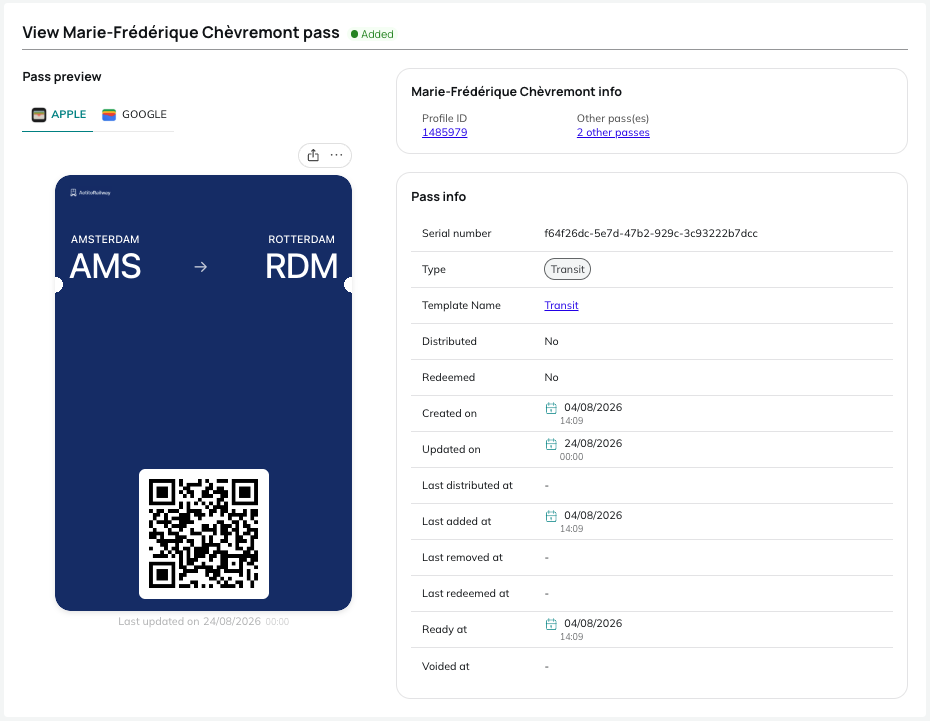
To open a pass's detail view, select it in the list and click View. This view lets you preview the pass on both platforms and access the profile and pass template it is linked to.
Pass preview
The Pass preview displays the pass as its recipient sees it. By default, the preview opens on the tab matching the client's OS (Apple or Google). Switch between the Apple and Google tabs to check the rendering on each platform.
To display the back of the pass, click the "..." button on the preview, just as you would flip a pass on your phone.
Profile and pass information
Two panels next to the preview give you the full context of the pass:
- The profile panel shows the Profile ID and the number of other pass(es) attached to the same profile. Click the Profile ID to open the associated profile, or other pass(es) to open the profile's "Digital assets" tab.
- The Pass info panel lists the details of the pass, such as its serial number, type, status, and key dates. Click the Template Name to open the corresponding pass template in the editor.