Published forms
After the publication of your form, modifying it directly is not possible anymore. However, some features remain available for an active form.
You will be able to modify some aspects of your form, copy it in order to reuse its parameters, and verify and test your form.
To do so, go to the "Active" tab of the "Forms & Pages" module.

Select the form with which you want to interact and its line will turn green.
On the one hand, you can View the participations and See the publication URL.
On the other hand, many additional interactions are available by clicking on the More button.

A wide range of features will be available to you.
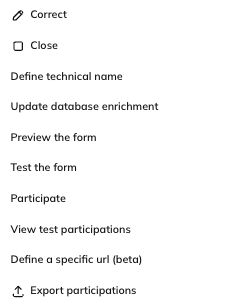
Copy
This feature allows you to copy a form in order to use it in a new context. You will be invited to give a new name to the form, then to check its settings.
This copy will retain:
- The main parameters
- The questions
- The display conditions
- The enrichment rules
All while allowing you to modify these elements.
This option is also available for "Finished" forms.
Correct
This option is the most similar to directly modifying your form.
By clicking on Correct, you will create a temporary copy of your form, which will replace the existing form only after confirming the publication of the new version.
This will give you the opportunity to edit:
- The design
- The name of the form
- The questions
- The display conditions
- The additional pages
- The languages
However, correcting the form will not allow you to modify:
- Entity and profile table parameters
- Enrichment rules
After carrying out your modifications, you will be invited to confirm the publication of the new form. This will immediately replace the existing version of the form, while keeping exactly the same URL if your form was published publicly. It means that, if your form had already been shared by e-mail or another channel, the new version would be immediately available to your contacts.
However, the participation records of the previous version will be kept.
Close
Click on the Close button to close the form and therefore remove access to it. If one of your contacts attempts to reach the form after its closure, they will be directed to the "Closed" page (as long as you defined it).
As it will not be possible to re-activate a form after closing it, you will be asked to confirm your action.

After closing the form, it will be displayed in the "Finished" tab to the left of the screen, where you retain the possibility to access a limited range of interactions, namely viewing (test) participations, as well as previewing and copying the form.

If you decided not to accept participations anymore after a specific date, you will be able to close it via this option.
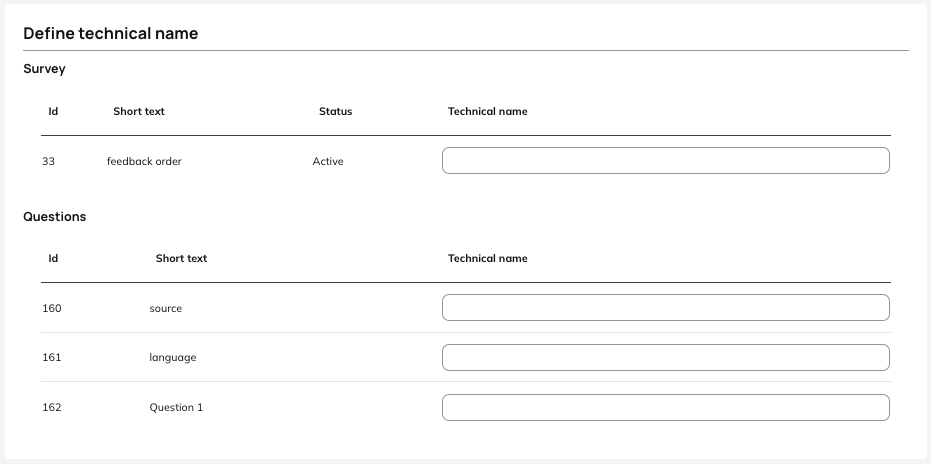
Define technical name
This button will allow you to define a technical name for the form and for each of the questions. This technical name will act as an ID used in webservices related to forms.
Update profile enrichment
After publishing your form, it is still possible to modify your profile enrichment rules.
Click on Update profile enrichment to open the "Profile enrichment rules" interface. You will have the opportunity to modify the enrichment rules, exactly as explained in the Enriching your profiles through a form chapter. We invite you to browse this chapter if you want a global overview of the settings available to update your profiles thanks to a form.
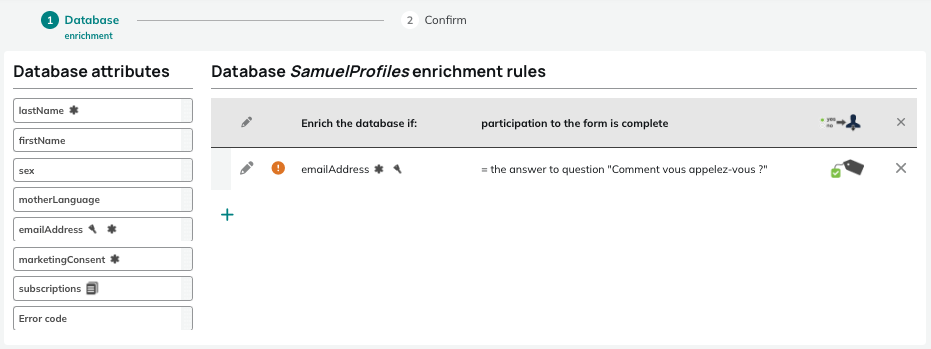
As the new rules will immediately replace the existing rules, you will be required to confirm the modification.
Modifying the enrichment rule will not revert any already registered update to a profile attribute.
Preview the form
This option allows you to display the design of your form:
- Either via a global preview of all questions and pages of your form.
- Or by selecting a specific profile among your testing groups, which will let you check display conditions or pre-filling parameters.
This option is also available for "Finished" forms.
Test the form
Select this option to carry out a test participation of the form.
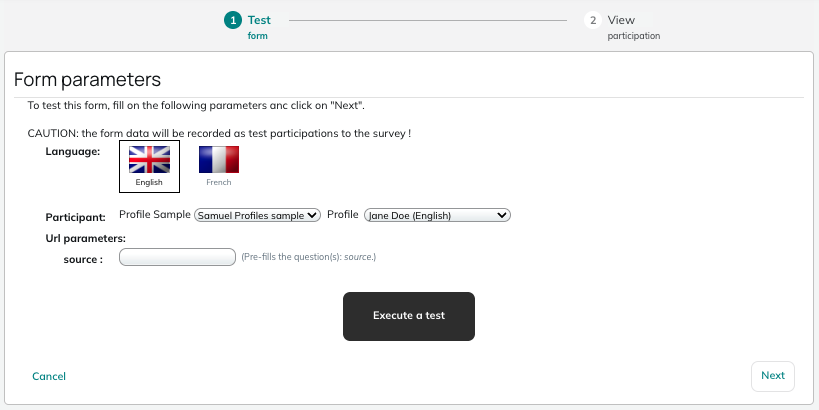
You have the possibility to define several test parameters:
- Language
- Global test or selection of a particular participant profile among your testing group
- Source parameters of the form
Your test will be registered as a test participation.
Participate
This feature lets you select a profile and participate in the form while acting as this profile. It is therefore necessary to only use this feature with internal profiles on which specific tests must be carried out.
You have the possibility to define the language and the source parameters.
This participation is not a test but a real participation which will be registered for the selected profile. Interactions will be taken into account and the potential attribute enrichment will be done.
View test participations
This feature is similar in all points to the View participations feature, except that it will only display test participations.
This option is also available for "Finished" forms.
Define a specific URL
This feature will enable you to replace the URL automatically generated after the publication of your form by a custom URL. For additional information, we invite you to read the Managing the Publication URL section.