Targeting
Actito's targeting application lets you select profiles in Actito at a given moment. Two principles are essential to keep in mind:
- Actito always starts from a selection of profiles: if you target, for example, purchases in certain stores, you are actually selecting the profiles who made a purchase in those stores.
- Actito calculates the targeting when it needs to: when sending an email, SMS or paper campaign, when triggering a scenario, or when you click "Calculate" — always based on the information known at that moment. A targeting is therefore a calculation at a given moment, not a fixed group of profiles (to durably group profiles, segments are more suitable).
The targeting application is available everywhere in Actito where profiles need to be searched.
Going further
How to visualize your target?
Drawing sets is often the best way to picture a targeting: we recommend reasoning with set theory.
Illustration of set theory
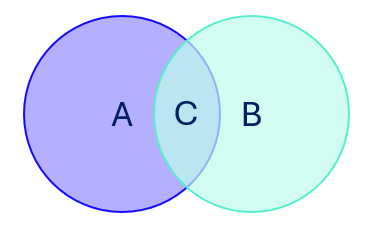
A: profiles that have blue
B: profiles that have green
A ∪ B (A union B): profiles that have blue OR green
C: profiles that have blue AND green
The classic pitfall comes from the gap between everyday language and logic:
- "Contact the profiles in the blue segment and those in the green segment" (i.e. both groups) translates logically to A OR B — the union of the two sets.
- "Contact the profiles in the blue segment or the green segment" gives exactly the same result: A OR B.
- "Contact the profiles who are both in blue and in green" corresponds, on the other hand, to the intersection: A AND B.
To see how this translates concretely in Actito, see Understanding targeting modules.
How to succeed in your targeting?
Find our recommendations in the article Targeting with success.