Mobile tables
Mobile channels are at the heart of today’s customer engagement strategies. Push notifications and in-app messages make it possible to reach users instantly, deliver highly relevant content, and interact with them at the most impactful moments—while they are actively using your app.
To support these powerful channels, the Actito app automatically enriches your data model with dedicated mobile tables. These tables are designed to capture the full mobile experience, from the devices your users rely on to the activity in your website or native app.
By collecting detailed device and app activity data, Actito enables precise targeting, personalization, and performance measurement across mobile campaigns. This data foundation ensures that every push notification and in-app message is not only delivered reliably, but also aligned with real user behavior, helping you build more meaningful, timely, and effective mobile experiences.
Architecture of the Mobile Native Data Model
When an Actito app is created, several assets are automatically added to support mobile and web engagement:
- An anonymous profile table:
<Profile table name>Anonymous<Application name> - A device table:
Devices - <Application name> - An anonymous device table:
Devices <Application name> - Anonymous - An app activity table:
App Activity - <Application name> - An anonymous app activity table:
App Activity - <Application name> - Anonymous - A web and/or app subscription in the existing profile table
- A web and app subscription in the anonymous profile table
About profiles and devices
Adding push or in-app channels establishes a direct connection between your system and Actito. Through this connection, profiles (end customers) are recognized on both platforms via the devices they use when subscribing to push notifications on your app or website.
When a user opts in, their device is recorded and synchronized with Actito. Opted-in devices are stored in different tables depending on whether the user is identified or anonymous.
Identified subscribers
An identified subscriber is a user whose opted-in device is linked to a known end-customer ID. This association occurs when a visitor authenticates on your website or mobile app, for example, by logging into their customer account or registering in the app.
These devices are then linked to the corresponding profiles in your existing profile table and can be used across push, in-app, and all other channels.
Anonymous subscribers
An anonymous subscriber is a user whose device is opted in, but whose identity is not yet known (for example, because they are not logged in). In this case, the scripts installed on your website or app cannot associate the device with a customer ID.
These devices are stored in a dedicated anonymous profile table, where anonymous users are automatically created and maintained until they become identified.
One profile, multiple devices
In Actito, a profile is typically associated with a single email address or a single mobile phone number. Push notifications, however, follow a different logic.
A single profile can be linked to multiple devices, such as a smartphone, a tablet, or a desktop computer using different browsers. Each of these devices may independently opt in to push notifications while interacting with your app or website.
As a result, when you send a push campaign from Actito, the profile can receive the message on each opted-in device, ensuring consistent and comprehensive reach across the user’s device ecosystem.
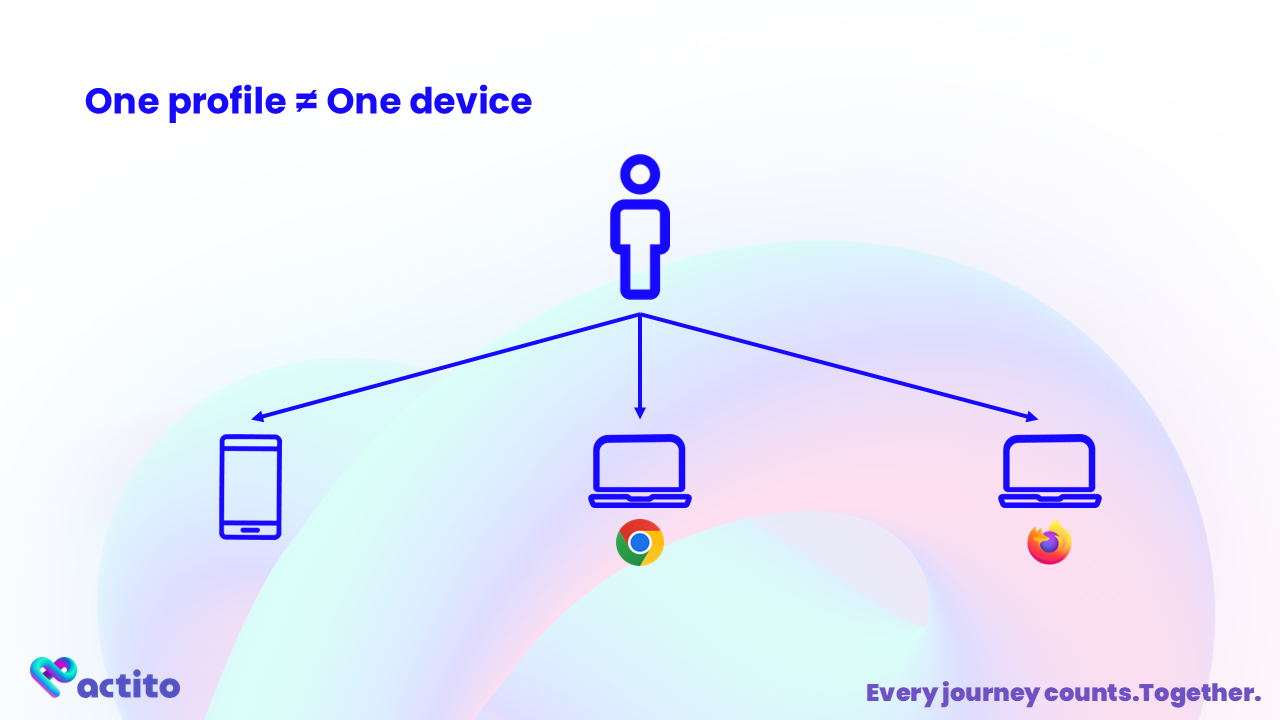
- In this example, 1 person = 3 devices
- To be contactable, the profile has to allow notifications on the app/browser of a device.
About the end-customer ID
The end-customer ID is the unique identifier that allows a profile to be recognized across systems. It is defined by your own environment (for example, your CRM) and is used by Actito to connect and synchronize profiles consistently. This end-customer ID must be known by your native app or website.
A device is associated with an end-customer ID when a user subscribes to push notifications while being known to your system—for instance, when they are logged in to your website or mobile app.
To ensure proper synchronization, the same end-customer ID must exist in the Actito profile table. This shared identifier is what enables Actito to link profiles, devices, and subscriptions across channels and systems.
Assigning an end-customer ID to a device is a dedicated step in the setup process. Refer to the detailed guides for:
About data synchronization
Data synchronization between your system and Actito is required to push identified profiles (those linked to an end-customer ID). Since these profiles must authenticate on your website or app, they should already be known to your system and included in your standard data flows.
When a profile subscribes to push notifications on your website or app, the opted-in device is synchronized with Actito. As part of this process, a specific subscription is updated on the profile matching the subscriber’s end-customer ID.
As part of the integration, dedicated push subscriptions are created (depending on your setup):
- A Web subscription
- An App subscription
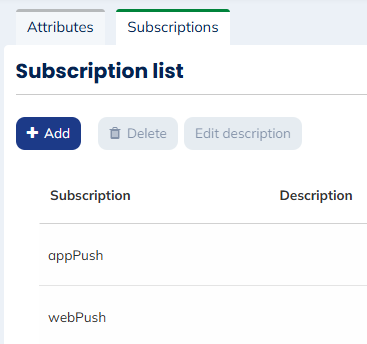
These subscriptions are updated automatically and in real time whenever a known profile gives or withdraws consent to be contacted via push notifications on a website or mobile app.
A single profile can subscribe to push notifications on multiple devices or browsers:
- As long as at least one browser remains opted in, the Web subscription value stays
True. - As long as at least one mobile device remains opted in, the App subscription value stays
True.
Example:
A profile opts in on Firefox and later opts out on Chrome. The Web subscription remains True.
If the profile opts out on both Firefox and Chrome, the Web subscription is automatically updated to False.
A profile may not yet exist in Actito when they give consent on your website or app. In this case, an anonymous profile is created.
When the identified profile is later imported into Actito, the platform checks whether an opted-in device already exists for the same end-customer ID and updates the subscriptions accordingly.
Depending on the operating system, uninstalling an app may not immediately revoke push consent. However, the next time a push campaign attempts to reach the device, it will be detected as unreachable and automatically unsubscribed.
The same behavior applies if a device becomes permanently unusable.
When a user switches to a new device (for example, a new phone or laptop), they must opt in again to receive push notifications.
Initially, the old device may remain opted in. Over time, it will be marked as inactive by the operating system and automatically unsubscribed.
Push subscription synchronization is one-way. The opt-in status is controlled by the user on your website or app.
Subscriptions must not be modified directly in Actito, as such changes will not be reflected on the device.
About the anonymous table
When the owner of an opted-in device cannot be identified using an end-customer ID, a profile is created in the anonymous table.
If an end-customer ID is provided at subscription time but does not match any existing identified profile, an anonymous profile is created.
The anonymous table has a minimal structure:
- The profile language, derived from the device settings
- An ID, based on the device identifier
- Web and App subscriptions, identical in structure to those in the identified profile table
As with identified profiles, a linked data table is created to store the devices associated with anonymous profiles.
Because the profile ID is device-based, the same person can have multiple anonymous profiles if they use several devices anonymously.
Identifying an anonymous profile
What happens when an anonymous profile becomes identified?
This can occur, for example, when:
- A visitor who subscribed anonymously creates an account or logs in, allowing an end-customer ID to be linked to the device
- A profile is imported later, matching an existing anonymous device due to asynchronous data flows
When this happens:
- The device is transferred to the identified profile in the main profile table, with traceability ensured through Moved attributes
- The relevant subscription (Web or App) is transferred if the device was opted in
note
Devices are transferred with exactly the same status and information as recorded in the anonymous tables.
- The device and subscription are removed from the anonymous profile, which can no longer be contacted through anonymous campaigns
Anonymous profiles without any active device are automatically deleted, ensuring that identified users are not contacted through anonymous campaigns.
Definition of the Actito app
You must create your Actito app within your license. One app corresponds to:
- One identified profile table
- One website
- One mobile app
As described above, creating the integration also generates the creation of other assets.
If you do not have a mobile app, you can configure only a website (and vice versa).
A native mobile app available on both iOS and Android is considered a single mobile app.
If you need to link multiple websites or apps, manage pre-production environments, or work with multiple profile databases, you can create multiple Actito apps.
You can create, update, and view your Actito apps in the dedicated module.